
How to Write a Service Page That Answers Customer Questions
A visitor opens a page about brake work because a warning light came on. The text says you offer “quality auto care” and “complete solutions,” but it never says whether a diagnostic visit is included, whether the shop works on that model, or how to book. This is a fictional example, not a measured case. The problem is ordinary: the page talks about the business, and the visitor still cannot tell what this one job includes.
A clear service page answers those buying questions in plain language. The job is not to sound impressive. It is to explain the scope, the limits, the price method, the process, the proof you can actually show, and the next step a person can take. This guide is about editing one existing page, not building a new website.
Define the job of this service page
One page should do one job well. It should help a person decide whether this service is the right match, what is and is not included, and how to get in touch. It does not have to introduce the whole company or answer questions that belong elsewhere.
If you also have a homepage or a campaign page, keep their roles separate. A homepage can point people to the right service. This article stays on what to write inside one service. Choosing a whole site structure is a different decision.
One service, a clear scope
Name the service the way a customer would recognize it, then define its edges. “Brake inspection and repair” is clearer than “we handle it all.” Say who it is for, what work is included, and what is excluded. If the shop diagnoses first and repairs only after a separate approval, say that. If a photography session includes a set sitting time but not every print right, say that too.
The scope should be true for your business, not padded to sound larger than you are. If availability is limited to a region, a shop address, or certain days, put that on the page.
Service detail vs a list of services
A list of services is a menu. A detailed page explains one item on that menu. You need a separate page when the service has its own useful information: a different process, different limits, different proof, or a different way to start. You do not need a new page for every slight wording of the same job.
If two offers share the same process and limits, they can often live as sections on one page. If a customer would ask a different set of questions—a full wedding session versus a short studio portrait—those usually deserve their own pages. The test is useful information, not a mechanical “one page per name” rule.
Answer the buying questions before polishing copy
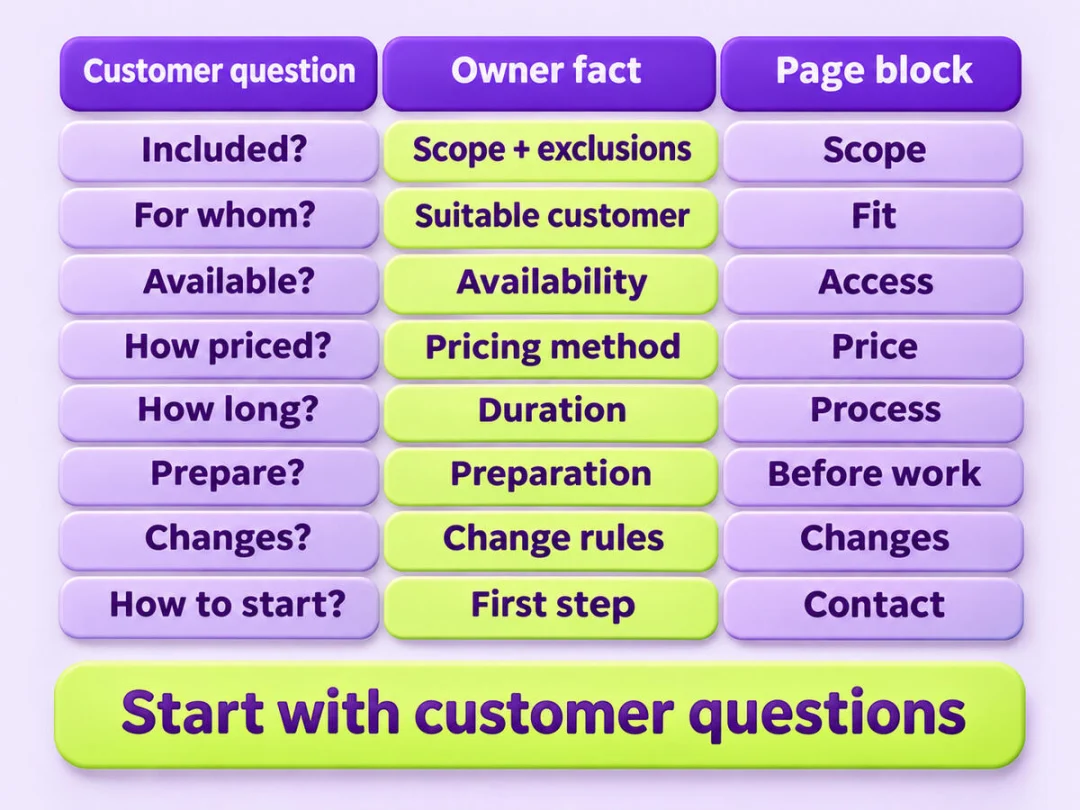
Before you rewrite headlines, write down the questions a serious visitor already has. Then attach a fact you can stand behind and decide where it will live on the page. Service page content starts with those answers. Polished wording comes second. If you need to use the language customers actually search for, do that as a wording check, not as a reason to invent claims.
The table below is a working sheet, not a required layout. Facts must come from the person who delivers the work.
| Customer question | Fact the owner must confirm | Where it belongs |
|---|---|---|
| What work is included, and what is not? | Included tasks and clear exclusions | Scope, near the top |
| Is this service for me? | Who it is for, and who it is not for | Opening block |
| Where and when is it available? | Real area, location, and hours you keep | Availability |
| What will it cost, or how is price worked out? | A published rate, a range you honor, or a quote after inspection | Price factors |
| How long does the work take? | A true range or condition for this business | Process and timing |
| What should I prepare or bring? | The actual prep the customer must do | Before the visit |
| What if I cancel or change the date? | Your real change rule, in plain words | Conditions |
| How do I start? | The true next step, with working contact details | Contact |
Who it is for and what is included
Be specific about the customer and the job. “Family portrait session for two to five people, outdoors, within our listed travel area” is more useful than “we photograph life’s moments.” Put the limits in the same section, not in a footnote. If a diagnostic visit does not include parts or labor for the later repair, say so beside the visit.
Do not hide exclusions in vague adjectives. “Full service” and “complete package” do not say whether oil, parts, retouching, usage rights, or delivery are included.
Price factors and limitations
If every job is different, still explain how the price is built. Name the factors you actually use: inspection first, parts, labor time, travel, number of edited images, size of the artwork, or revision rounds. If you publish a starting rate, it must be a rate you would honor for the described scope. Do not invent a low “from” price just to fill the page.
Limitations belong next to price, not after the contact button. Name the service area, the jobs you do not take, materials you do not use, and conditions that change the timeline—only if they are true today.
How the work proceeds
Describe the sequence in the order it actually happens. For a shop, that may be drop-off, inspection, approval, repair, and pickup. For a session, that may be a planning note, the sitting, a preview, and delivery of the agreed images. For a commissioned piece, that may be a sketch, material confirmation, production, a revision window, and delivery.
Give time as a condition or a range this business can keep, not as a slogan. If the timeline depends on parts, weather, or drying time, say so. Then tell the customer what to prepare and how a change or cancellation is handled in your real process.
Start with customer questions
Build a readable page, section by section
Once the facts are written down, arrange them so a person can scan the page and still find the answer. Service page design, in this article, means a clear order of sections and readable labels—not a trend or a copied layout from another site. A service business website can be simple and still be useful if these pages are easy to follow on a phone.
A specific heading and useful opening
The heading should name the service, not a slogan. “Brake inspection and repair in [your city or shop name]” is clearer than “Driven by excellence.” The opening should say who the service is for, what is included at a high level, and what the visitor can do next. Leave proof, price factors, and the longer process for later sections.
Do not pack the heading with every possible wording. One clear name is enough. If a second popular wording matters, use it naturally in the opening.
Scope, process, proof, and questions
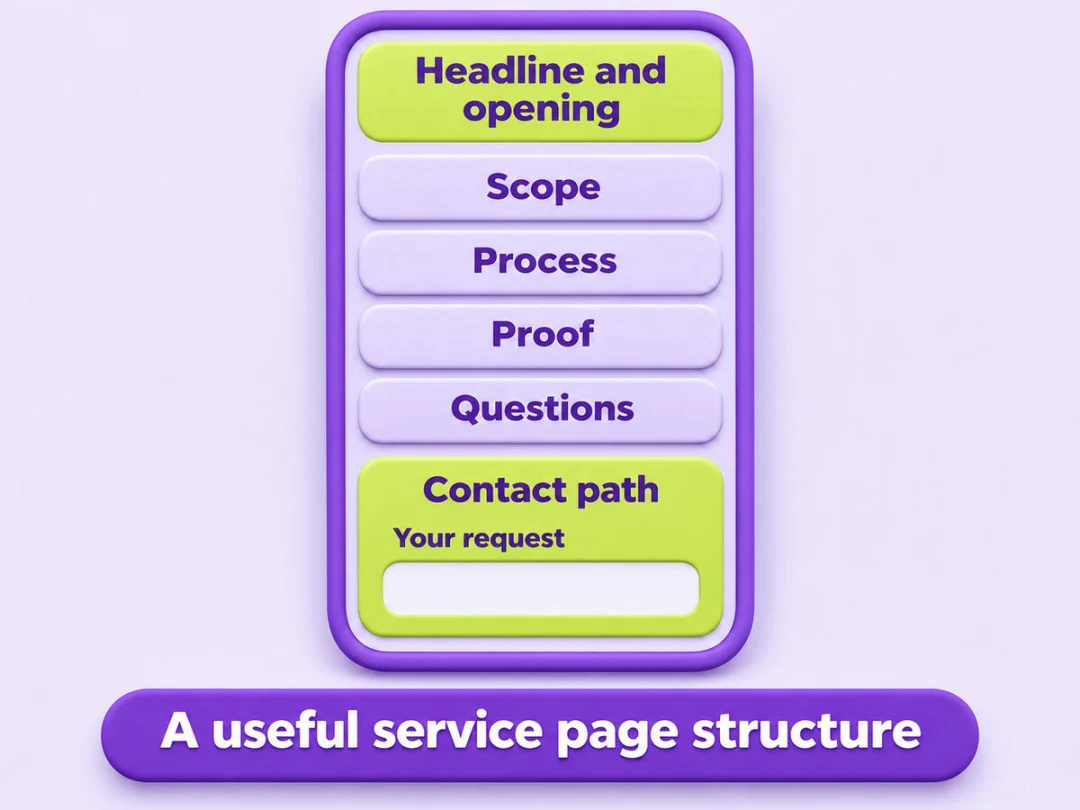
A practical order is: a specific heading, a short opening, scope and exclusions, price factors, the process, proof you can substantiate, common questions, and a contact path. You can change the order if customers always ask about price first, but do not bury scope or limits at the bottom.
Keep each section short enough to read on a phone. Use subheadings that match the question the block answers. A short list is often clearer than a long paragraph when you name included tasks, required prep, or revision limits.
Proof should sit close to the claim it supports. A photo of a completed repair belongs near that service, with a caption that says what the visitor is looking at. A qualification belongs next to the work it actually covers.
A clear contact path
The next step must be a step you can keep. If the page offers a form, the fields should match the information you actually need for this service. Different jobs need different questions; there is no universal set of three fields. Each field needs a visible label tied to the control. A placeholder inside an empty box is not a complete substitute for a label.
After someone submits the form, show a clear confirmation or a clear error. The confirmation should say that the request was received and, if you can stand behind it, what happens next. Do not promise an instant reply unless that is truly how you work. Do not remove privacy information or accessibility aids just to make the button look more prominent.
A useful service page structure
Three service page examples without vague promises
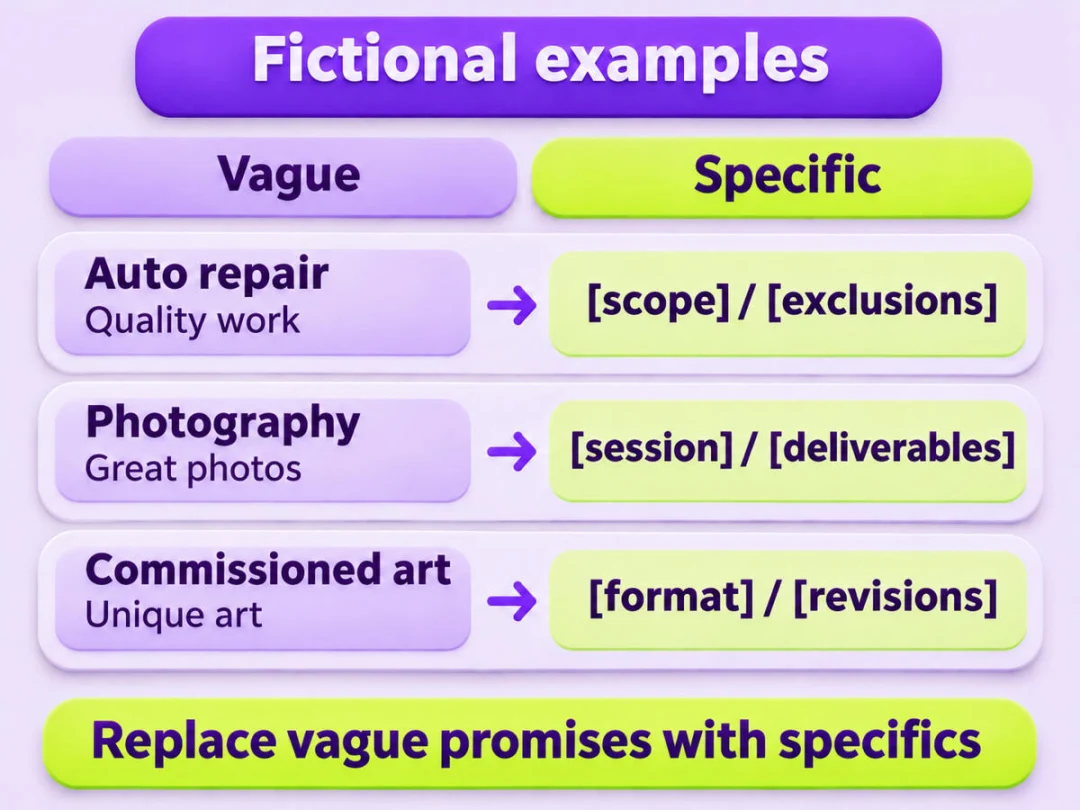
The three examples below are educational. They are not real businesses, not results from this site, and not a pitch for those services. Each one shows how a vague promise can be replaced with a specific answer. Where a number, price, date, or certificate would be needed, the text uses a placeholder so you fill in only facts you have.
Auto repair
Unclear: “We offer complete brake service and quality repairs you can trust.”
More specific, still fictional: “This page covers brake inspection and repair for [listed passenger vehicles]. A diagnostic inspection is a separate visit. It includes [the checks you actually perform] and a written estimate for any repair. Parts and labor for the repair are not included in the inspection. If you approve the work, we schedule it for [your real timing condition]. We work by appointment at [shop address or service area]. To request a visit, use the form and tell us the [year, make, model, and the symptom].”
The important change is the boundary: a diagnosis is not the same as any repair the customer hopes will happen the same day.
Photography session
Unclear: “Book a beautiful family session and get all the photos you need.”
More specific, still fictional: “This outdoor family session is for [two to five people] and lasts [the sitting time you actually book]. The fee includes [the number of edited images you deliver] and travel within [your listed area]. It does not automatically include full commercial usage rights, extra retouching beyond [the agreed edits], or a second location. After the session, you will receive a preview and may request [the number of revision rounds you allow]. To check a date, send the form with [your preferred time of day and the location type].”
A session is not a blanket grant of every right and every edit. Those terms need their own sentences.
Commissioned artwork
Unclear: “Custom art for any space, delivered with a smile.”
More specific, still fictional: “This page is for commissioned [medium, such as a framed portrait] at [the size range you accept]. The process starts with a sketch for approval, then work in [the material you actually use]. The quoted fee includes [the number of revision rounds] and delivery within [your stated method and area]. It does not include [a change of size after approval, a new reference photo after the sketch is accepted, or rush production] unless we agree to that separately. To start, send [the subject, the size, and the deadline you need to check].”
Materials, revisions, and delivery have to be agreed. A warm promise does not replace those terms.
Replace vague promises with specifics
Use proof you can substantiate
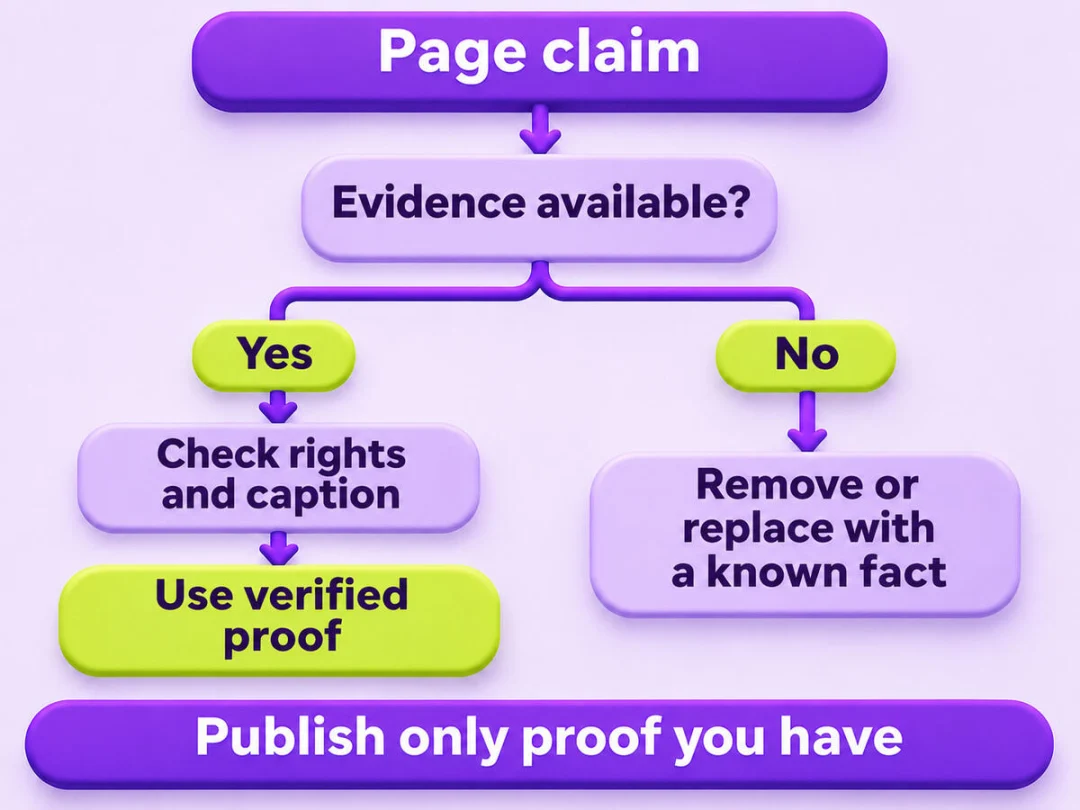
Proof is useful only when you can show it. Use finished work you have the right to display, photographs you own or have permission to use, and qualifications that can be checked. If a customer has given permission for a genuine review to appear on the page, you may include it. Do not invent testimonials, star ratings, certificates, client counts, or years of experience.
Before a claim goes live, the person responsible should be able to answer: do we have this proof, can we show it, and does the caption describe it accurately? If the answer is no, remove the claim or replace it with a fact you do have, such as a process photo or a plain description of the method. A rating from reviews is not, by itself, a right to display search stars.
When you add project photos, prepare useful, lighter project photos so the images help the visitor understand the work without slowing the page. This is not a request to create nearly identical city pages, and it is not a review-collection tutorial.
Publish only proof you have
Check the page before it goes live
Read the page once as if you were the visitor with the original question. Confirm that the scope, exclusions, and price method still match what the business will honor this month. Check that the address, hours, phone number, and form still work. Submit a test request and see the confirmation or error yourself.
A retired offer, an old travel area, or a process you no longer use should come off the page. Then check nearby links. A short path to a related service or a relevant question can help if the destination is genuinely useful. You can connect related pages where it helps readers without turning the page into a sitemap. This check is editorial, not an SEO audit checklist.
FAQ
How do I write a service page for a small business?
Collect answers you can confirm: who the service is for, what is included and excluded, how price is worked out, how the work proceeds, and how a person starts. Then put those answers in a readable order. Do not begin with slogans and fill the gaps later.
Should each service have its own page?
Only when the service has its own useful information and a visitor would ask a different set of questions. A slight change in wording is not enough reason to publish a near-duplicate page. Shared process and limits can often live together.
How long should a service page be?
There is no required word count for ranking, and the length of this article is not a model for your page. Write enough to answer the buying questions honestly, and keep it readable on a phone. Extra sections that repeat the same promise do not make the page stronger.
Should I show a price if every job is different?
Show the real method and the factors you use. If you publish a number, it must be one you would honor for the described scope. Do not invent a “from” price to occupy the space.
What can I use instead of testimonials?
Use real work, a clear process, and qualifications you actually hold. If you do not have reviews you are allowed to publish, leave that block out. Do not write fake reviews or borrow someone else’s praise.
What belongs on a service page, not the homepage?
The details of one service: scope, limits, price factors, process, proof, and the way to start that job. The homepage can help a visitor choose a path. It does not have to carry every condition for every offer.
Clear answers matter more than a longer page
A useful service page is a set of answers a customer can trust. Name the job, draw its edges, explain the price method, show the proof you have, and offer a next step you can keep. Length is not the goal. Clarity matters.