
AI Shopping Agents: Why Your Store Gets Missed and What to Fix
A shopper asks an assistant for a jacket with a few real constraints: material, size, and delivery within the U.S. Your store already sells that SKU. The answer still lists two or three other merchants. That scene is a fictional example, not a measured case study. It is still the worry many owners feel when they hear about AI shopping agents.
This guide is a DIY audit for a small catalog, and an AI search visibility check at the same time. You are not building an agent. You are checking whether your products can be found, understood, and trusted when a shopping system gathers options. Missing from one answer is not proof that you are blocked or “too slow.” Relevance, category rules, delivery coverage, and channel eligibility matter too. This audit focuses on two fixable barriers: getting a usable response when live data is needed, and giving accurate product facts so the offer is safe to recommend.
How shopping agents discover and compare products
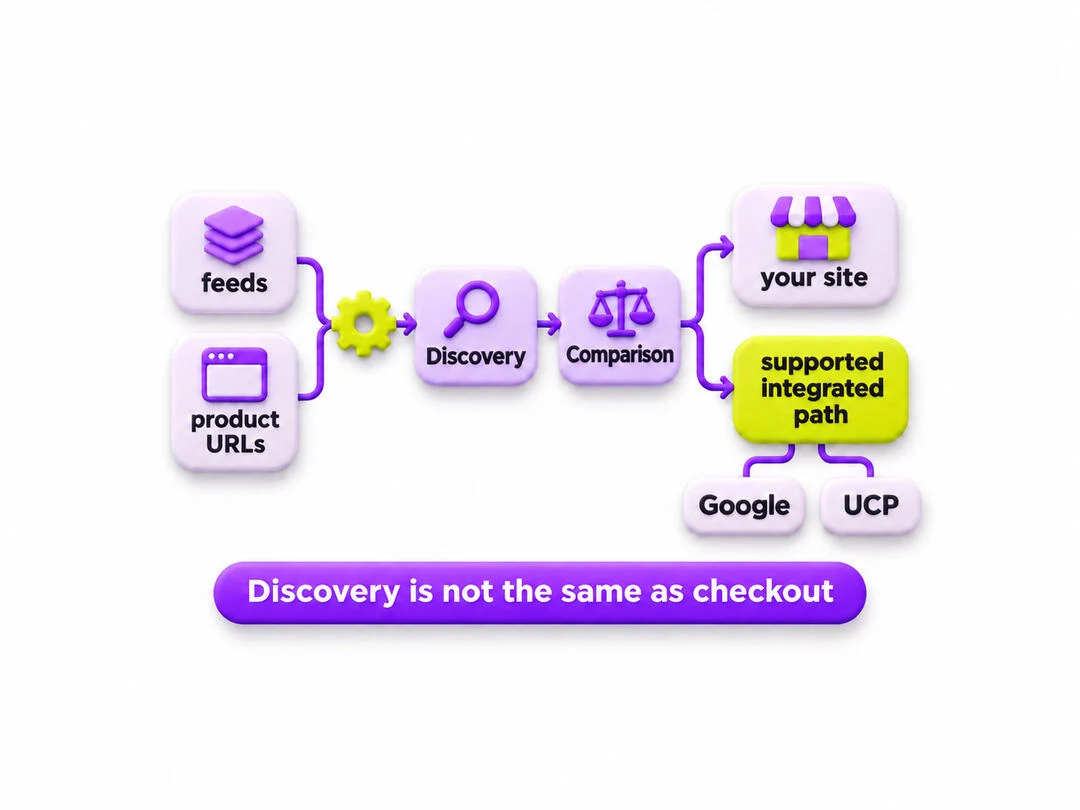
Agentic commerce is a broad label for shopping flows where software helps discover products, compare offers, and sometimes start a purchase. That is not the same as a fully autonomous checkout that never asks a person to confirm. Treat discovery, comparison, and payment as separate steps with different rules on each platform.
Discovery is not the same as autonomous checkout
Discovery matches a question to candidate products. Comparison weighs price, attributes, shipping, and availability across a shortlist. Checkout is where the buyer pays, often on your site, sometimes through a supported integrated path. A store can appear in discovery and still fail later if stock, shipping, or returns data look unreliable. A polished checkout page also does not help if the catalog never reaches the shopping surface in a supported way.
ChatGPT Shopping, Google AI Mode, and Perplexity
In ChatGPT, shopping surfaces today emphasize discovery through feeds and supported merchant programs, with the buyer typically continuing to the merchant’s own site or app. Do not assume every store can complete purchase inside the chat window. Rules and eligibility change; verify current merchant documentation.
Google AI Mode shopping and related Gemini shopping surfaces sit inside Google’s shopping stack. For many merchants, discovery still depends on a healthy Merchant Center catalog and channel settings. Direct checkout, where offered, is separate from discovery.
Perplexity Shopping is another surface with its own checkout naming and partner flows, not a clone of Google or ChatGPT. Check the supported catalog route and checkout availability for each platform separately.
| Surface | Where product data may come from | Discovery vs purchase | Caveat |
|---|---|---|---|
| ChatGPT product discovery | Supported merchant feeds and programs | Discovery first; purchase path depends on current program rules | Not every store is eligible; Instant Checkout is not a universal default |
| Google AI Mode / Gemini shopping | Merchant Center and Google shopping infrastructure | Discovery often via catalog; checkout only where supported | Availability and features vary by region and channel setup |
| Perplexity Shopping | Platform shopping inventory and partner paths | Shopping experience with its own checkout naming | Confirm current help docs and checkout availability for that surface |
Where Universal Commerce Protocol fits
Universal Commerce Protocol (UCP) is an open standard for agentic commerce that Google describes as developed with Shopify and other participants. It enables machine-readable commerce interactions, not a ranking score and not a required registration for every AI search. Do not confuse UCP with ChatGPT’s separate commerce protocol (ACP). They are different. A small store does not need to implement UCP to start improving feeds, speed, and data quality. UCP matters for certain supported Google checkout paths; it is not a universal gateway for every assistant.
Discovery is not the same as checkout
Slow responses can break a live shopping request
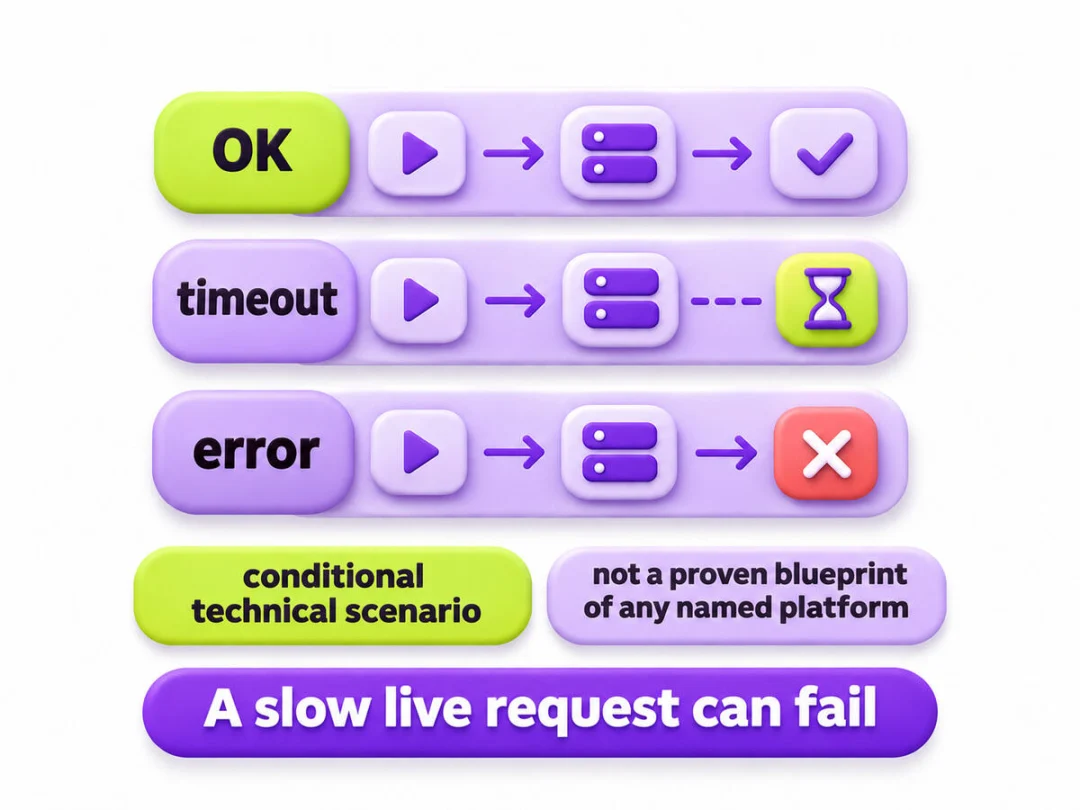
Not every recommendation is built by hitting every storefront at query time. Many answers lean on preprocessed feeds and indexes. Still, when a shopping scenario needs live facts (current stock, a shipping quote, a cart total), ecommerce site speed and API reliability matter. A slow or failed response can keep your offer out of that shortlist.
Treat response health as something to test, not a diagnosis you can infer from a missing recommendation. Check whether the channel can retrieve a product page, current availability, or a shipping quote successfully. If a live request fails, record the endpoint and error so you can investigate. A changing shortlist alone does not tell you whether speed, relevance, eligibility, or another factor caused the change.
Measure server and API response, not just page appearance
A pretty product page can hide a sluggish backend. Check the product URL, the feed endpoint if you publish one, and any inventory or shipping API your channel uses. Record whether the HTTP response succeeds. Separate time-to-first-byte from full page load. Check under ordinary and busier conditions. Looking at a high percentile of latency (for example, p95) is useful, without inventing a magic target for every agent.
Watch for 403, 429, and 5xx responses, long redirect chains, and bot challenges that block legitimate crawlers. Lightweight HTML, careful backend work, and caching that still refreshes price and stock help people and machines. They do not guarantee a recommendation.
Separate timeouts, errors, and stale cached responses
A timeout means the caller gave up waiting. An error means the server answered unsuccessfully. A stale cache means you answered quickly with outdated price or availability. All three hurt trust in different ways. A late reply can drop out of a live shortlist. That is not the same as automatically losing a place in an already built index.
There is no single confirmed “must respond under N seconds for every shopping agent” threshold in public primary docs reviewed for this article. Use the limits of the integration you join. When price or stock changes often, shorten cache lifetimes or invalidate affected entries according to the integration’s requirements. Prefer clear errors over silent hangs.
For the measured side of this, what slow responses cost in real orders, see A slow store is invisible to an AI agent.
A slow live request can fail
If you need a calendar for the work, organize the fixes into weekly work and track each fix with an owner and a verification step.
Product feed optimization starts with reliable data
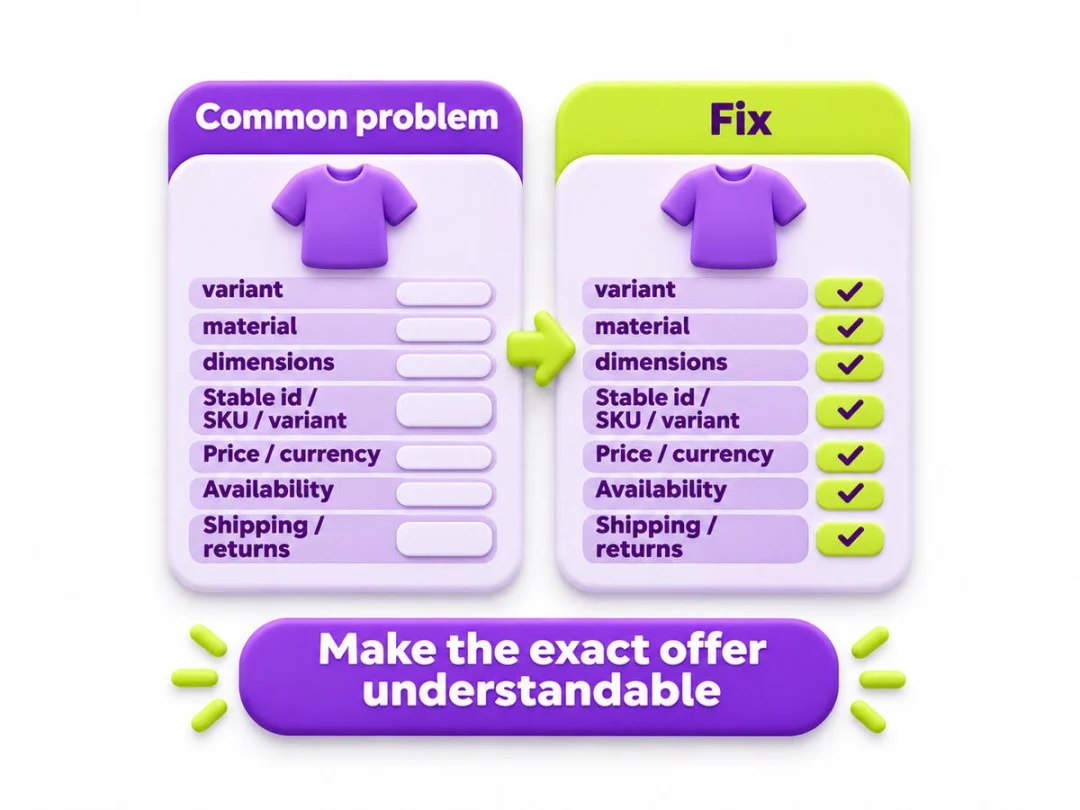
Product feed optimization is less about clever titles and more about product data quality: can a machine tell which variant you sell, at which price, in which currency, with which shipping and return terms? Unclear or conflicting facts make an offer harder to verify. Focus on the parts you can inspect: a usable response, identifiers and categories where required, specific titles, current price and stock, and an accessible return policy. These checks address avoidable data problems; they do not reveal why a particular system chose another merchant. That is what Google Shopping feed optimization means in practice: one source of truth for price, stock, and shipping, checked against what the shopper sees.
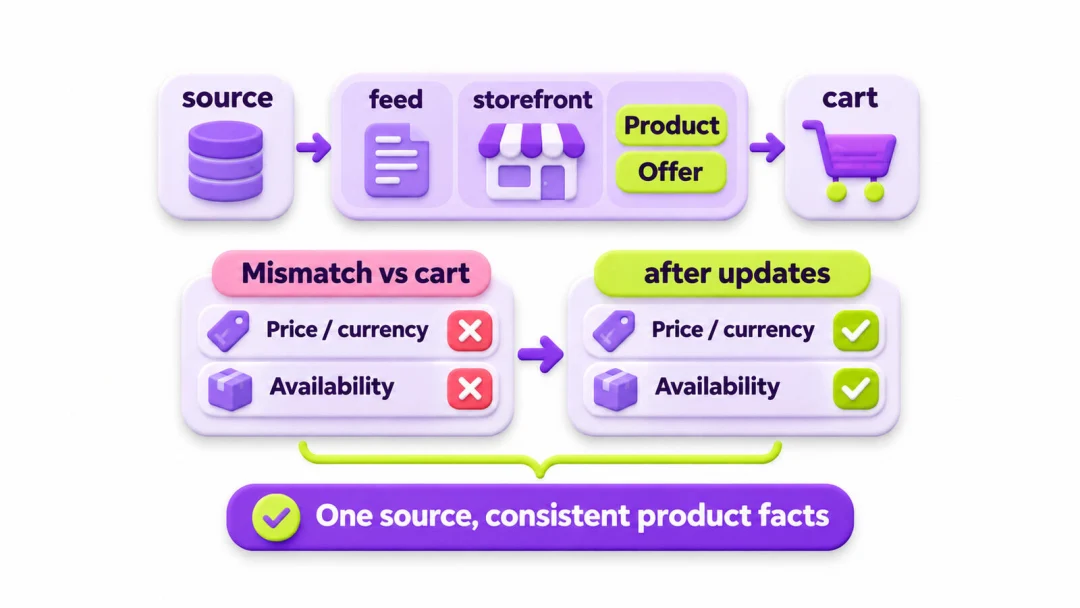
Test the handoff from product discovery to purchase. Choose a variant and compare its stock status and delivery terms in the catalog source, feed, product page, and cart. If the values disagree, trace the update path before treating the offer as ready. This is a consistency check, not evidence of a measured conversion gain.
Identify the exact product and variant
Give each sellable item a stable internal id or SKU. Variants need their own stable identifiers so a feed row matches the URL and the cart line. When a GTIN/UPC is assigned and valid, pass it. Brand and MPN help when the channel expects them. Never invent barcode numbers or paste a SKU into a GTIN field. Do not set “identifier does not exist” flags without a real reason.
Not every product needs a GTIN. Custom, handmade, and other exception categories may correctly ship without one. Channel rules decide what is required. Missing a hand-entered Google product category is also not a universal ban. Some systems categorize automatically, but clear taxonomy still helps matching.
Make attributes useful for real shopping questions
Shoppers ask about material, dimensions, compatibility, and what’s in the box. Fill those fields in the language buyers use. Keep titles specific without stuffing. Descriptions should match the variant. Images should show the real offer; when you improve photos, make product images useful and lighter while keeping each image accurate for the selected variant.
Structured Product and Offer markup can mirror the visible card. Treat product structured data as a consistency aid, not a guarantee of inclusion. One feed field and one on-page fact should not disagree.
Keep price, availability, shipping, and returns consistent
Price and currency must match across catalog source, feed, storefront, and cart. Availability must reflect what you can ship. Shipping regions and costs should be visible before purchase when the channel allows. Return policy should be reachable, not buried behind an unrelated footer link.
| Field | Common problem | Fix | Where to verify |
|---|---|---|---|
| Stable id / SKU / variant | Same id reused across unrelated items | One id per sellable offer; map variant to URL | Feed export, admin catalog, cart line |
| GTIN (when assigned) | Invented or borrowed codes | Use only assigned valid GTINs; mark true exceptions | Channel diagnostics, manufacturer docs |
| Brand / MPN | Blank when the channel expects them | Fill per rules; keep consistent spelling | Feed, product page |
| Category / product type | Vague or empty | Choose the best supported taxonomy value | Merchant Center or channel taxonomy |
| Title / description | Generic names (“Item 12”) | Name the product and key attributes clearly | Storefront, feed preview |
| Size / color / material / compatibility | Missing answers to real questions | Add attributes shoppers ask about | Attributes table, Q&A logs |
| Image | Placeholder or wrong variant | Real photo of the offer | PDP, feed image URL |
| Price / currency | Mismatch vs cart | One source of truth; same currency codes | Feed vs PDP vs checkout |
| Availability | “In stock” when empty | Sync inventory on a schedule that matches how fast stock changes | Inventory system, feed, cart |
| Shipping / returns | Hidden until after payment | Publish policy and rates where the channel expects them | Policy pages, channel settings |
Feed refresh rhythm should match how often prices and stock change. Do not promise universal real-time sync. Platform auto-updates do not replace a clean source of truth for ecommerce product data.
Make the exact offer understandable
One source, consistent product facts
Give the right crawlers and channels access
Even perfect attributes fail if the shopping channel cannot read your catalog. Start with supported integrations, then check crawlers and firewalls separately.
Feeds, Merchant Center, and supported integrations
For Google-related discovery, keep a working Google Merchant Center feed and review its diagnostics. Other assistants use their own merchant programs. Confirm each one you care about. Crawlable product URLs still matter for systems that fetch pages. Structured Product/Offer data can support consistency; it is not a universal substitute for a feed. Small stores are not required to expose a public commerce API or implement UCP to begin. ChatGPT product feed programs, where available, are one path among others; eligibility is not automatic.
Robots.txt and WAF need separate checks
AI crawlers are not one bot. OAI-SearchBot is associated with search crawling; GPTBot is associated with training data collection. You can allow search access without opening training, and the reverse, depending on your policy. Do not assume that blocking GPTBot removes you from ChatGPT Search, or that allowing GPTBot places you there. Feed-program terms can add separate requirements.
PerplexityBot is described as a search-index crawler, distinct from user-triggered fetchers. For Google surfaces, follow current Search and Shopping rules; do not treat Google-Extended as a switch you must flip for AI Mode without checking today’s guidance.
On the WAF side, verify legitimate crawler traffic with official IP lists and verification methods, not a single spoofable User-Agent string. Do not disable all bot protection or expose customer accounts and order APIs.
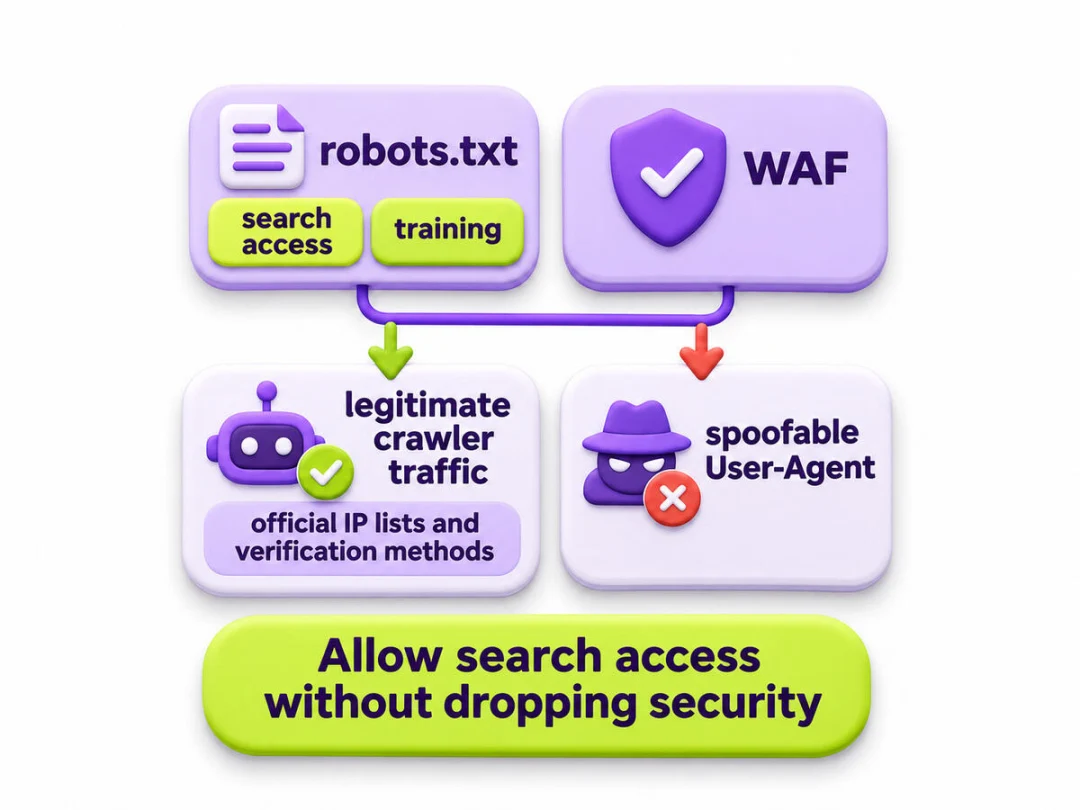
Allow search access without dropping security
A practical store-readiness checklist
Use this table as a working checklist for AI shopping agents readiness. Assign an owner, keep evidence, and expect observation, not guaranteed placement.
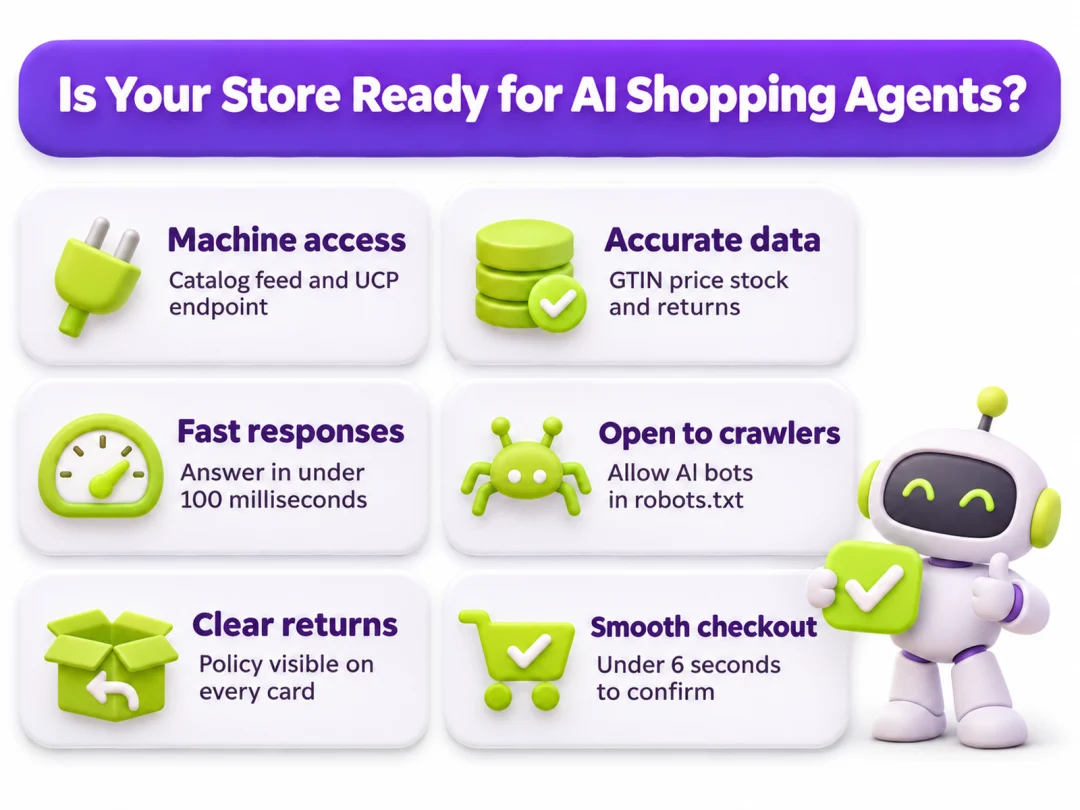
Store readiness checklist for AI shopping agents
| Check | Action | Evidence of result | Owner |
|---|---|---|---|
| Machine-readable catalog | Publish through a supported feed/channel; for Google, maintain Merchant Center | Feed accepted; diagnostics clear or triaged | Catalog / developer |
| Readable product facts | Ensure PDP and Product/Offer match the selected variant | Spot-check titles, price, availability on page vs markup | Catalog |
| Identifiers and attributes | Fill required ids and attributes; document GTIN exceptions | No fake GTINs; variants map cleanly | Catalog |
| Healthy responses | Fix unexplained timeouts, errors, redirect chains, and bad challenges on critical paths | Logged success rates and latency notes | Developer |
| Fresh price and stock | Align source → feed → storefront → cart after updates | Successful refresh visible in diagnostics | Catalog / ops |
| Crawler access | Confirm search bots are not blocked by accident in robots.txt or WAF | Verified allow rules for authentic crawler traffic | Developer |
| Shipping and returns | Publish costs/regions and return policy before purchase where possible | Policy URLs resolve; channel settings match | Owner / ops |
| Reliable checkout | Keep variant, totals, and shipping clear; preserve secure payment confirmation | Test order path without technical dead ends | Developer / owner |
| Follow-up | Re-check after changes; note what appeared in diagnostics | Dated notes, no promise of inclusion | Owner |
When you prioritize broader SEO work, decide which visibility tasks come first. This checklist stays focused on catalog access and accuracy for shopping agents.
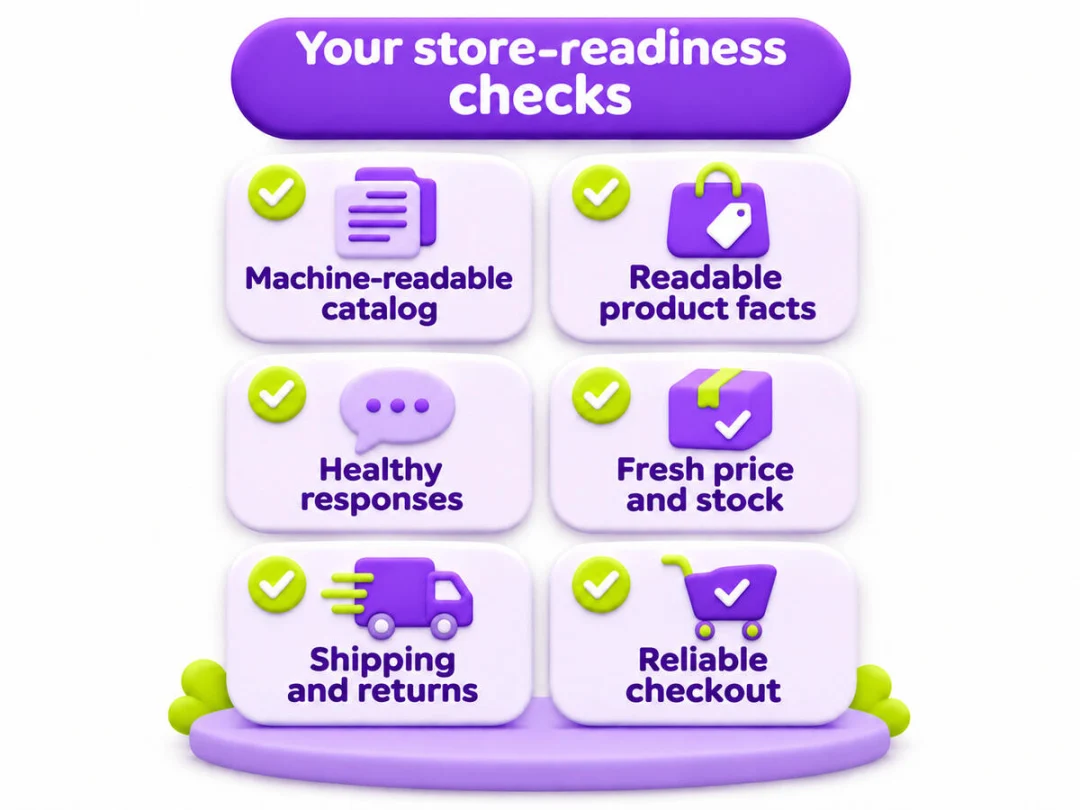
Your store-readiness checks
FAQ
Why do AI shopping agents miss products that are already on my site?
Because the product may be hard to access, hard to understand, or simply not the best match. Eligibility and delivery coverage also matter. Fixing feeds and speed helps, but it is not a guaranteed cure.
Do shopping agents query every store in real time?
There is no solid basis to claim that. Many answers rely on feeds and indexes. Live requests happen in some steps, but platforms differ. Do not plan around a mythical “poll every store every time” design.
How can I get my products into ChatGPT Shopping?
Check whether your commerce platform already provides a supported catalog connection; otherwise review the current merchant feed application path. Presence in a feed is not a promise that every query will show your SKU.
Does every product need a GTIN?
No. Use an assigned valid GTIN when you have one. Some products correctly have none. Never invent codes.
Does blocking GPTBot remove my store from ChatGPT Search?
Not by that fact alone. GPTBot relates to training; OAI-SearchBot relates to search crawling. Manage them separately, and read feed-program terms on their own.
Is UCP required for AI product discovery?
No. UCP supports certain integrated commerce flows in Google’s ecosystem. Discovery can use other catalog paths. UCP is not a universal ranking requirement and is not the same as ACP.
How fast must my site or API respond?
There is no single confirmed public threshold for every agent. Measure successful responses and latency for the integrations you use. For the measured test of what slow responses cost, see A slow store is invisible to an AI agent.
Why this works: explanations, examples, and evidence
The audit checks four things: access, data, speed, and a working purchase path. Each one maps to a step the machine takes. A shopping system first finds candidate products, then compares them, then tries to buy one. If it cannot read your catalog, it never reaches the comparison. If it cannot trust the facts, it drops the offer even when the price is right. If the live request fails, the offer leaves the shortlist. The checklist follows that order on purpose.
Two examples
Example one: a store changes the price on its site after a promotion ends, but its feed still carries the old price. The agent quotes the old price, the shopper reaches checkout, and the total is higher. The shopper leaves. The store sees a lost sale and blames the agent, but the cause is a feed that updates once a day while the site changes hourly. The fix is to refresh the feed on the same schedule as the site, or to shorten the cache lifetime in the feed program.
Example two: a store firewall blocks a search crawler by mistake. Its products stop appearing in that channel's answers. Nothing else changes: the feed is fine, the prices are right. The owner only finds the cause in the firewall log, after weeks of silence. The fix is one allow rule for the crawler, checked against the vendor's published IP list. Both examples illustrate the mechanism. Neither is a measured case study.
Example three is real: purchases at Walmart inside ChatGPT converted three times worse than clicks through to the company's own site, largely because stock and delivery data in the feed did not match reality. The full case is in the companion article A slow store is invisible to an AI agent.
The numbers behind the audit
Adobe found that up to 46% of some retailers' sites are unreadable to machines: the page looks fine to a person and returns an almost empty document to a bot. In ChatGPT Shopping, the share of product picks coming from integrated feeds jumped from 8.26% to 61.54% in one week in July 2026, while the number of unique sellers in answers fell from 13,524 to 10,607. Of 687 stores sampled, 450 lost at least a third of their visibility in seven days. AI traffic to US retail grew 62% year over year in July 2026 and converted 60% better than regular traffic. The speed figures come from Google UCP pilots: sellers responding faster than 100 milliseconds appeared in recommendations 3 to 5 times more often than sellers responding in 300 to 500 milliseconds, with the caveat that exact thresholds differ between agents. The full test behind the speed figures is in A slow store is invisible to an AI agent.
Exceptions
The rules in this audit do not cover every store. Handmade and custom products often have no GTIN, and that is fine when the channel does not require one. Stores that sell only through a marketplace, such as Etsy or Amazon, do not run their own feed: the marketplace supplies it. Feed-only programs never crawl your site, so robots.txt changes nothing for them. A store can stay out of an answer for reasons outside this audit, such as category rules, delivery coverage, or channel eligibility. The audit fixes what you can control. It does not promise a place in every answer.
Fix access and accuracy before chasing visibility
For AI shopping agents, start with machine access to the catalog, then trustworthy product facts, then a reliable purchase path, then careful observation. Speed without accurate stock still fails. Perfect attributes behind a blocked crawler still fail. Do the checklist and re-check after each change, without expecting a guaranteed slot in every answer.